Trade
Buy and sell
Every coin has its own page: chart, trades, holders, info, and the buy/sell panel. Same terminal on Solana, Robinhood Chain and Arc.

Quick buy, quick sell
Tap an amount and go.
| Chain | Quick buy | Quick sell |
|---|---|---|
| Solana | 0.1 · 0.25 · 0.5 · 1 SOL | 10 · 25 · 50 · 100% |
| Robinhood Chain | 0.005 · 0.01 · 0.02 · 0.05 ETH | 10 · 25 · 50 · 100% |
| Arc | 10 · 25 · 50 · 100 USDC | 10 · 25 · 50 · 100% |
Change them with Edit quick buy amounts. The first time you tap one, you choose once: Buy now (one tap trades) or Just fill it in (it fills the box, you press the button). Sell 100% sells your exact on-chain balance.
Slippage
The most the price can move against you before the trade fails instead of filling. Default 1.5%. Presets 0.5%, 1.5%, 3%, or custom up to 50%. Open it from the gear: Trade Settings → Slippage tolerance.
Lower is safer; higher fills in fast markets. If you see Price moved — raise slippage and retry, that's this.
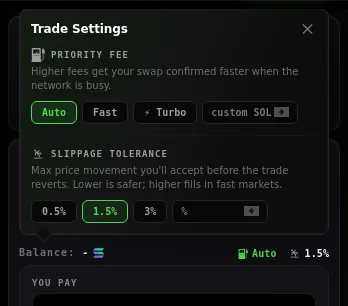
Priority fee (Solana)
Auto (default, reads recent network fees), Fast (×3), ⚡ Turbo (×8), or your own amount in SOL. Higher gets you in faster when the network's busy. On Robinhood Chain and Arc your wallet sets the gas when you approve, so there's nothing to pick.
Instant trades
With the 1EDGE Wallet you can skip the approval popup.
- Turn it on in Settings → Wallet → Instant trades. One signature, good for 30 days.
- Buys, sells and creator-fee claims on 1EDGE sign straight away, up to your limit per trade. Default: 10 SOL · 0.45 ETH · 1,200 USDC. Set 0 to turn a chain off.
- Anything else always asks. Over your limit, it asks.
- Your receipt shows ⚡ INSTANT.
- Trades on open launches still ask for approval for now.
Your own wallet (Phantom, MetaMask…) always asks.
What you'll see
Preparing transaction… → Approve in wallet… → Confirming… → Bought $SYM. Then a receipt: what you got, at what market cap, your position now, and a link to the transaction. Swipe it away.
Who can buy what
- Before graduation, buying needs your pass. On an open launch the pool checks it on every buy.
- Selling is open to anyone, always.
- After graduation, anyone buys and sells, here or anywhere.
Minimum buy on the Solana curve is 0.01 SOL. There's no maximum apart from the coin's wallet cap. A buy that would overshoot graduation is cut to what the curve needs; the rest stays in your wallet.
No SOL on the right chain?
On a Robinhood Chain coin with only SOL in your wallet, switch to Pay with SOL. It's bridged and bought in one go. See Bridging.
Protection that's always on
- One buy per slot (Solana) or per block (Robinhood Chain, Arc), so bundles can't stack buys.
- An opening grace: nobody buys in the very first seconds after launch.
- Curve buys can't be sandwiched.
- Open launches: the launch shield.
Errors you might hit
| You see | What to do |
|---|---|
| Price moved — raise slippage and retry | Raise slippage a little, or try again. |
| Another buy took this slot — try again in a second | One buy per slot. Tap again. |
| Buys open a few seconds after launch — try again | The opening grace. Wait a moment. |
| You need a 1EDGE pass to buy this token on the curve. | Get your pass. You can still sell. |
| That buy is over the wallet cap right now. Buy less. | The coin's wallet cap. |
| ⏱ Cooldown — wait 30s before your next buy | The creator set a cooldown. |
| Your 1EDGE pass is too new to buy this token yet… | The creator set a reputation check. It ends within minutes. |
| Your priority fee or Jito tip is over this token's fee cap… | Lower it, or wait for the cap to end. |
| No wallet-to-wallet sends until graduation. You can sell any time. | Open launch transfer lock. |
| Took too long — try again | The network was slow. Try again. |
| Your wallet didn't answer… | Check your wallet: the trade may have gone through. |
More: Troubleshooting.
Watchlist
Star a coin anywhere and it's tracked on your Dashboard: price, market cap, bonding progress. Only you see it.